
Every project has a different rule mix
Jurisdiction, project type, public funding, site conditions and scope can change which requirements need attention.
Monitor the worker safety, permitting, licensing, environmental, labor and public-contract sources your firm selects. Rixena helps teams see what changed, important dates, affected topics and areas that may require review.
Construction and engineering firms may follow federal safety rules, state licensing and codes, environmental permits, labor standards and owner-specific contract requirements. Rixena organizes selected sources into a consistent review process.
Jurisdiction, project type, public funding, site conditions and scope can change which requirements need attention.
Safety, environmental, quality, contracts, HR, design and field operations may each own part of the response.
Licensing boards, building departments, code adoptions and permit authorities may update requirements on different schedules.
Changes may affect safety plans, specifications, subcontract clauses, wage determinations, permits and quality procedures.
Select the federal, state, local and standards sources that matter to your work. Available coverage depends on the monitors and sources selected.
Selected OSHA 29 CFR Part 1926 rules, interpretations, directives and guidance involving construction hazards and employer responsibilities.
Selected state licensing-board, contractor-license, engineering, architecture, building-code and local permit materials.
Selected EPA and state materials involving construction stormwater, SWPPPs, wetlands, air, waste, spill prevention and environmental review.
Selected FAR, agency acquisition, Davis-Bacon, prevailing-wage, certified-payroll and public-works sources relevant to covered projects.
Selected accessibility, design, infrastructure, owner and technical-standard materials relevant to the services your firm provides.
Selected sources that may affect documentation, inspection, quality, subcontract flow-down, training and recordkeeping procedures.
Monitor availability and applicability vary by source, jurisdiction and organization. Your team chooses the watchlist it wants Rixena to follow.
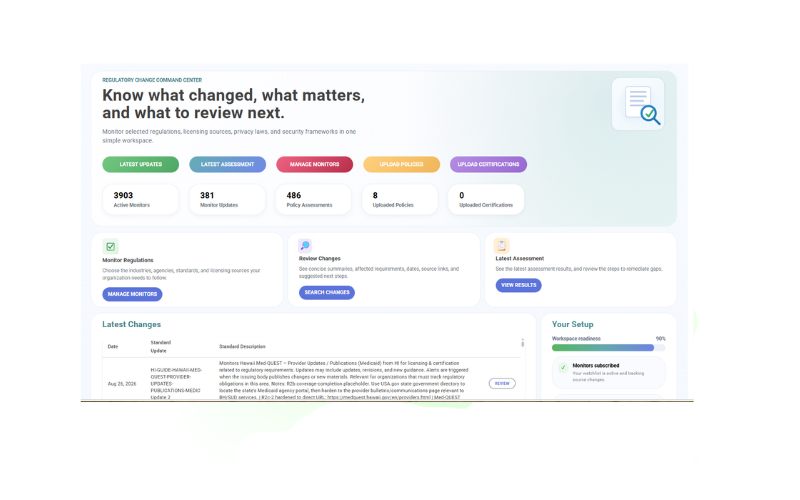
Select your monitors, receive organized change intelligence and optionally connect policies or procedures for gap assessment.
Choose the agencies, regulations, standards, licensing sources and jurisdictions that matter to your operations.
See what changed, important dates, affected requirements, source links and suggested review areas.
Upload and assign relevant policies, procedures, plans or control documents to the monitors they support.
Review potential gaps, ownership, next steps and supporting evidence in a consistent workflow.
Rixena follows the rule, bulletin, manual, guidance or licensing source your team selects.
The update is captured, summarized and organized so reviewers can focus on what changed.
Your team receives a focused review package instead of another unstructured alert.
Rixena can support firms that need separate watchlists by state, project type, client, discipline, contract vehicle or responsible team.
Create your free monitoring accountReduce repeated searches across individual regulator, agency and standards websites.
Give owners the source, dates, affected topics and review context in one place.
Connect selected requirements with the policies, procedures and plans your team relies on.
Keep regulatory updates, assessments, review activity and supporting evidence organized.
Start with selected regulatory sources, then connect project and corporate procedures when useful.
Talk to AllgressOrganizations can select relevant OSHA, EPA, Department of Labor, acquisition, state licensing, building-code and local permit sources. Available coverage depends on the monitors and sources selected.
Yes. Watchlists can be organized around jurisdictions, project types, legal entities, contract vehicles, clients or internal owners.
Uploaded plans, policies and procedures can be assigned to selected monitors so teams can identify areas that may require review when source material changes.
No. Monitoring and organized change summaries can be used without uploading documents. Uploads are optional.
No. Your firm and project professionals remain responsible for applicability, design and permitting decisions. Rixena provides regulatory intelligence and workflow support, not legal or engineering advice.
Create a free Rixena account and begin building a watchlist around the projects and sources your firm selects.